
Safety and privacy
Room to learn. You stay in control.
The buddy can’t hand over the answer. Your child’s work is never sold or used for ads. The switches that matter sit behind your grown-up PIN.
Safety
Three layers between your child and the answer.
Parents’ biggest worry about AI and homework is that it does the work. This one can’t. Every reply about graded work is checked against an answer key your child never sees.
The tablet never has the key
Answer keys live only on LegUp’s server. There’s nothing on the device for a curious child, or the buddy, to read out.
Graded replies are checked
Before your child sees or hears a reply about graded work, it’s checked against the key. Chat replies, typed or spoken, are checked sentence by sentence as they appear.
No ads, no data sales
You can download or delete everything. Using your child’s work to improve LegUp is on during the beta, and you can switch it off anytime.
Where the work goes
What the app sends to outside AI.
The buddy doesn’t run on your tablet. To read handwriting, give a hint or talk back, the app sends what it needs to an outside AI provider and screens the reply before your child sees it.
In the LegUp app
Today that provider is Microsoft Azure OpenAI Service, with Anthropic’s Claude as the backup. The buddy’s spoken voice uses Azure AI Speech.
In the demos on this website
The demos are scripted. They don’t contact an AI, create an account or save anything.
What gets sent, and why.
What gets sent
The text and images a reply needs: what your child writes or says to the buddy, pictures of their handwriting and the lesson they’re on.
What it’s for
Reading handwriting, checking work, giving hints and talking. Never advertising. LegUp shows no ads and doesn’t sell or rent anyone’s information.
What’s next
We’re building a LegUp model that picks the most useful next step. It isn’t in use yet, and it only learns from children whose training consent is on. See how it will work
Every service provider and what it sees is listed in the privacy policy.
Training consent
On during the beta, off whenever you say.
Training consent lets LegUp use your child’s learning traces (each attempt and the help they got) to train its own teaching model. During the closed beta it starts on, you can switch it off anytime, and it’s separate from using the app.
A grown-up decides
The switch lives in the grown-up controls, behind your PIN once you set one, and the server records who changed it and when.
What a record holds
Which questions came up, whether each answer was right, how long it took and which hints helped.
What never goes in
Your child’s name, your name or email, handwriting, drawings, chats with the buddy and the answer keys.
Off means off
Switch it off and your child is left out of every training set made after that. A model already trained isn’t changed.
Records are filed under a coded name, not a real one. That makes them harder to trace but not anonymous, so only authorized LegUp administrators can open them.
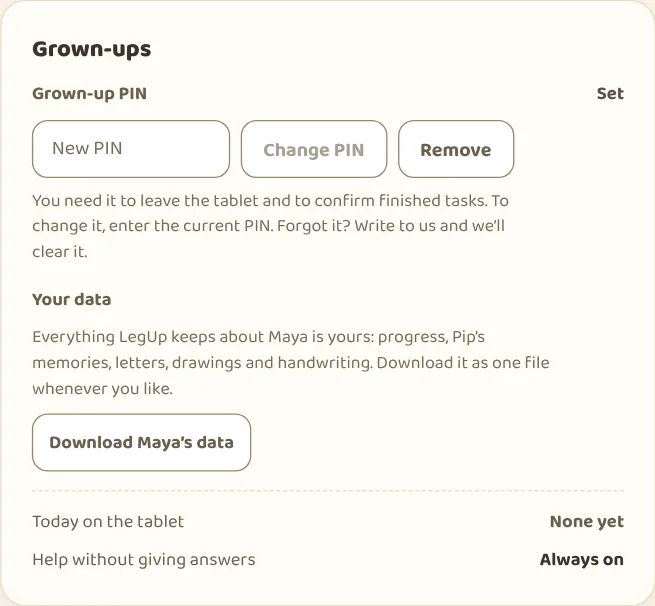
Your data
Download it or delete it. Anytime.
Download. One file with everything LegUp keeps about your child: progress, the buddy’s memories, letters, chats, drawings and handwriting. The PIN and the answer keys stay on the server.
Delete. One button removes your child’s record and files and stops the Friday letter. What deletion removes
Choose the features. Turn the buddy’s chat, voice, video requests and check-ins on or off whenever you like. With a PIN set, those changes ask for it.
Who sees what
Signing in doesn’t open every record.
LegUp checks that your account has a role for that child before it shows anything.
Parents and guardians
Every guardian you add sees what you see: progress, schoolwork, the weekly letter, the controls, the download and deletion. Only add grown-ups you trust with all of it.
Teachers
A read-only view of progress, schoolwork and handwriting. No moods, check-ins, chats or family letter, and no changes.
LegUp staff
Named staff with administrator access, to support families, fix problems and keep the service safe.
The app also uses analytics and error reports to find what breaks. This website sets no cookies. How this site counts visits
Give your kid a leg upthat lasts.
Start freeFree during the beta. Kindergarten to grade 6.
Works in the browser on any tablet. Our Android app is in closed testing, and an iOS app is planned.
On Google Play for Android tablets, and on the web for everything else.